Linux

使用阿里云ACR(容器镜像服务)链接GitHub构建

# 1. 推送代码到 GitHub
cd feishu_schedule_bot
git init && git add . && git commit -m “init”
git remote add origin https://github.com/你的账号/feishu-schedule-bot.git
git push -u origin main

# 2. ACR 控制台配置自动构建(2 分钟设置)
# → 镜像仓库 → 创建 feishubot/schedule-bot
# → 构建 → 添加规则 → 关联 GitHub 仓库 → 立即构建

在构建的时候出错如下:

1==========================================2[fetch stage begin.]3clone from remote repository: https://github.com/xxx.git, branch: main4Cloning into ‘/workspace’…5fatal: unable to access ‘https://xxx.git/’: Encountered end of file6[fetch failed, takes 90s.]7==========================================8[fetch stage begin.]9clone from remote repository: https://github.com/chaihuo/feishu_schedule_bot.git, branch: main10Cloning into ‘/workspace’…

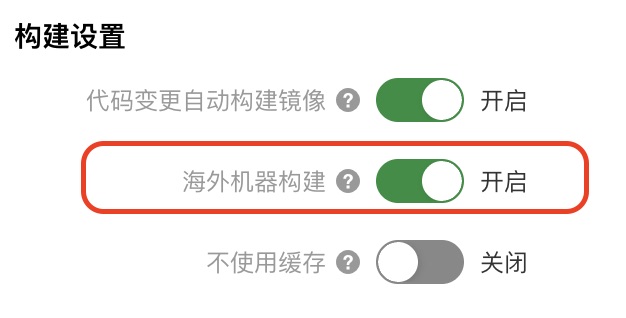
主要原因是国内的镜像节点连不上海外GitHub,一通操作,最后发现阿里云提供了海外机器构建服务,太贴心了!一键搞定
linux sftp user jailed into home directory

  • Check openssh version(Should newer than 4.8)

  • Edit ssh configuration file

  • Comment lines ‘Subsystem *’, add line:

  • Add lines from bottom of the conf file

  • Restart sshd service:

  • Create group

  • Create user

  • Correct directory ownership

  • Give password to your sftp user


使用rpm升级系统软件

参考链接(鸟哥):http://linux.vbird.org/linux_basic/0520rpm_and_srpm.php#rpmmanager_update

使用 RPM 來升級真是太簡單了!就以 -Uvh 或 -Fvh 來升級即可,而 -Uvh 與 -Fvh 可以用的選項與參數,跟 install 是一樣的。不過, -U 與 -F 的意義還是不太一樣的,基本的差別是這樣的:

-Uvh 後面接的軟體即使沒有安裝過,則系統將予以直接安裝; 若後面接的軟體有安裝過舊版,則系統自動更新至新版;
-Fvh 如果後面接的軟體並未安裝到你的 Linux 系統上,則該軟體不會被安裝;亦即只有已安裝至你 Linux 系統內的軟體會被『升級』!


删除软件:rpm -e

遇到有依赖无法删除,建议不要强行删除。检查yum为上策。


Java并发编程:线程池的使用 executor.shutdown() executor.awaitTermination(7, TimeUnit.DAYS)

参考链接:http://www.cnblogs.com/dolphin0520/p/3932921.html

几个理解的key

  1. 线程池执行实现了Runnable的类,其实是反射调用该类实现的run()函数
  2. 线程池加载所有任务后,可以关闭(不能再添加新的线程任务),等待所有线程执行完后退出。使用以下代码实现

ulimit配置修改

修改配置文件:/etc/security/limits.conf

星号代表全局,针对某个用户的话就把星号改为某用户

全部说明:


RedHat使用vnc远程显示桌面

安装vncserver


配置vnc


启动vnc

使用客户端连接

QQ截图20150804171734


关闭vnc连接

关闭vnc服务