
centos安装epel及remi
原文:http://www.rackspace.com/knowledge_center/article/installing-rhel-epel-repo-on-centos-5x-or-6x
How to install RHEL EPEL repository on Centos 5.x or 6.x
The following article will describe how to configure a CentOS 5.x-based or Centos 6.x-based system to use Fedora Epel repos and third party remi package repos. These package repositories are not officially supported by CentOS, but they provide much more current versions of popular applications like PHP or MYSQL.
Install the extra repositories
The first step requires downloading some RPM files that contain the additional YUM repository definitions. The instructions below point to the 64-bit versions that work with our Cloud Server instances.
Centos 5.x
|
1 |
wget http://dl.fedoraproject.org/pub/epel/5/x86_64/epel-release-5-4.noarch.rpm
wget http://rpms.famillecollet.com/enterprise/remi-release-5.rpm
sudo rpm -Uvh remi-release-5*.rpm epel-release-5*.rpm
Centos 6.x
|
1 |
wget http://dl.fedoraproject.org/pub/epel/6/x86_64/epel-release-6-8.noarch.rpm
wget http://rpms.famillecollet.com/enterprise/remi-release-6.rpm
sudo rpm -Uvh remi-release-6*.rpm epel-release-6*.rpm
Once installed you should see some additional repo definitions under the /etc/yum.repos.d directory.
|
1 |
$ ls -1 /etc/yum.repos.d/epel* /etc/yum.repos.d/remi.repo
/etc/yum.repos.d/epel.repo
/etc/yum.repos.d/epel-testing.repo
/etc/yum.repos.d/remi.repo
Enable the remi repository
The remi repository provides a variety of up-to-date packages that are useful or are a requirement for many popular web-based services. That means it generally is not a bad idea to enable the remi repositories by default.
First, open the /etc/yum.repos.d/remi.repo repository file using a text editor of your choice:
|
1 |
sudo vim /etc/yum.repos.d/remi.repo
Edit the [remi] portion of the file so that the enabled option is set to 1. This will enable the remi repository.
|
1 |
name=Les RPM de remi pour Enterprise Linux $releasever – $basearch
#baseurl=http://rpms.famillecollet.com/enterprise/$releasever/remi/$basearch/
mirrorlist=http://rpms.famillecollet.com/enterprise/$releasever/remi/mirror
enabled=1
gpgcheck=1
gpgkey=file:///etc/pki/rpm-gpg/RPM-GPG-KEY-remi
failovermethod=priority
You will now have a larger array of yum repositories from which to install.
2014年5月16日 Linux 0 Read more >
Centos设置代理
-
yum源
编辑/etc/yum.conf 文件
添加:
#Proxy
proxy=http://username:password@yourproxy:8080/
-
全局代理
编辑/etc/profile 文件
添加:
# Proxy
http_proxy=”http://username:password@yourproxy:8080″
export_http_proxy
或
# Proxy
export http_proxy=”http://username:password@yourproxy:8080″
-
wget代理
编辑/etc/wgetrc
添加:
2014年5月15日 Linux 0 Read more >
VSS 信息安全
VSS需要将存储信息的目录共享,该目录可被恶意用户拷贝破解,或者删除。这是VSS的方案缺陷,因此通过以下手段进行规避。
方案:
- 将原目录文件拷出(设为TEST目录),仅留用户验证用的srcsafe.ini文件。
- 将其他数据目录及文件放到另一安全目录(TEST_LOCK)。
- TEST目录设为共享,VSS用户具有全部权限。
- TEST_LOCK目录设为共享,VSS用户具有读写权限。
- TEST_LOCK下面的各个子文件夹另外设置权限:“列出文件名和目录”权限拒绝(这样一来用户无法访问及拷贝)。
- 修改srcsafe.ini文件,将data等VSS目录的地址指向TEST_LOCK.
Vss 搭建与配置
- 搭建
- windows下安装Vss2005
- 在windows下为每个Vss用户添加账户
- 配置
- 配置Vss server(打开Visual SourceSafe Administrator)
-
-
- 创建Vss database(File->new database)
- 为database创建用户(Users->add user)
- 打开用户权限管理(Tools->Options->Project rights)。如图打钩:

- 为database创建project(Archive->Archive projects->根据需要下一步)
- 定义project用户权限(Tools->rights by project)
-
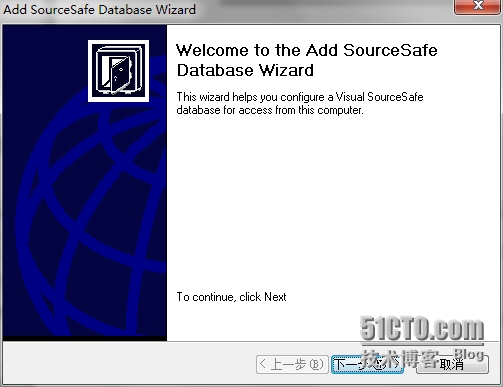
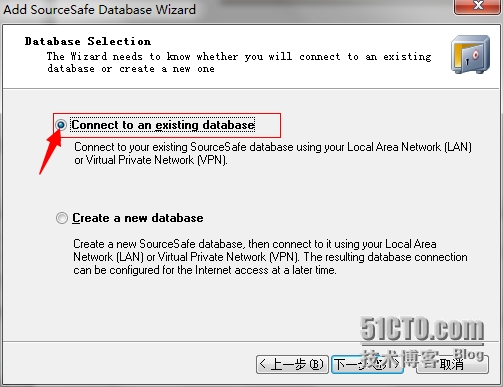
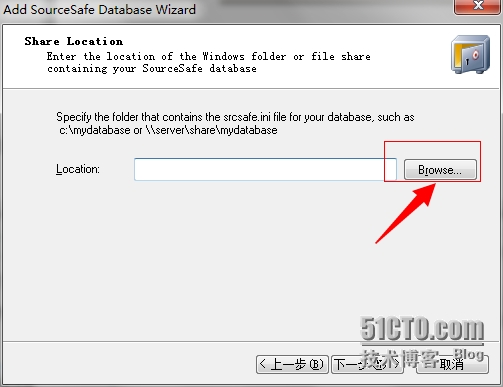
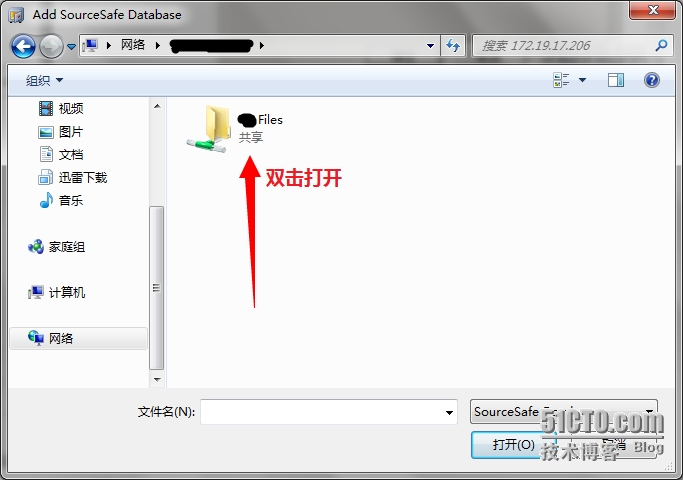
- 配置客户端(打开Visual SourceSafe 按图依次操作)


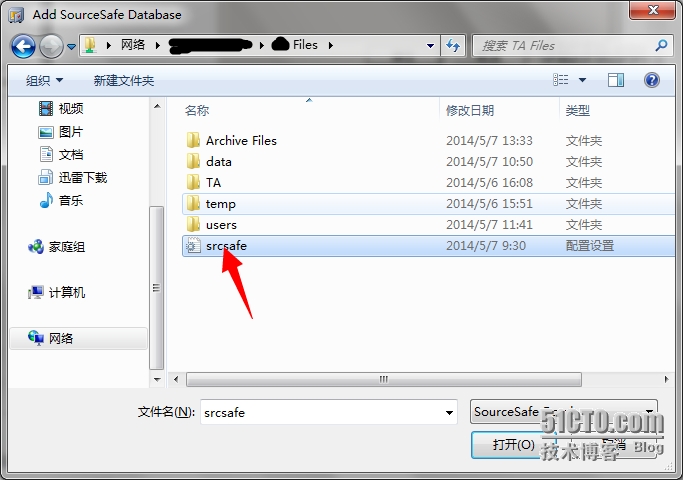
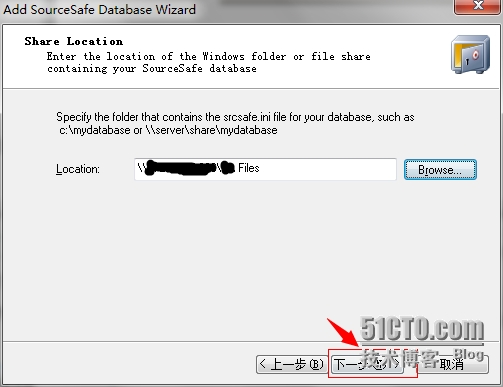


js的正则表达式
语法上,
d这种需要声明为:
var patt = new RegExp(“\d+”);
{}[]()这些都需要使用”\”转义。
使用上,
js的正则表达式支持的断言方式仅有两种。只可以截断后边界。截断前边界可以考虑二次处理的方式。
2013年11月1日 Linux 0 Read more >
查询或者修改数据的inner连接方法
http://home.51cto.com/index.php?s=/Home
1
UPDATE product p, productPrice pp
SET pp.price = pp.price * 0.8
WHERE p.productId = pp.productId
AND p.dateCreated < ‘2004-01-01’
2
UPDATE product p
INNER JOIN productPrice pp
ON p.productId = pp.productId
SET pp.price = pp.price * 0.8
WHERE p.dateCreated < ‘2004-01-01’
3
UPDATE product p
LEFT JOIN productPrice pp
ON p.productId = pp.productId
SET p.deleted = 1
WHERE pp.productId IS null
2013年11月1日 Linux 0 Read more >
java莫用jdk的File对文件进行删除、改
这是一个大坑,jdk本身对这些文件操作的实现很烂。经常会不返回任何错误的失败。
用apache的common-io吧:)
批处理的变量引用
变量引用:
%1与%~1的区别是%~1去掉了输入参量中的所有qoutes。
其他变量的引用方法可以用call /?查看
2013年6月21日 Linux 0 Read more >
javaSerializable接口
解释直接链到百度百科:
http://baike.baidu.com/view/1659412.htm
比较值得注意的:
Bean部分:transient和static变量的信息不可被保存。我的理解是这两者都依赖于原有的运行时环境,也没有保存的意义。
额,碰到这么合适
操作的网页:http://www.minxue.net/11/n-36311.html
被40个下载链接击败了。虽然耗时会多,果断写代码解决之。一个小时后…
修改了包含我要的链接的table名为hhh
|
1 |
<ol class="dp-c"><li class="alt"><span><span class="keyword">var</span><span> aa = document.getElementById(</span><span class="string">"hhh"</span><span>).getElementsByTagName(</span><span class="string">"a"</span><span>); </span></span></li><li><span><span class="keyword">var</span><span> bb = </span><span class="string">""</span><span>; </span></span></li><li class="alt"><span><span class="keyword">for</span><span>(</span><span class="keyword">var</span><span> i=0;i<aa.length;i++){ </span></span></li><li><span>bb = bb + aa[i].href + <span class="string">"n"</span><span>; </span></span></li><li class="alt"><span>} </span></li></ol> |
记事本写的。。格式就不搞了。。。
本文出自 “香蕉与打火机” 博客,请务必保留此出处http://bananalighter.blog.51cto.com/6386339/1126420